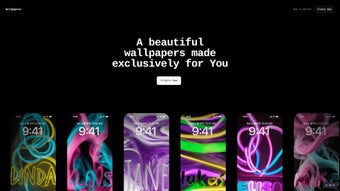

Download Wallpaperee – AI‑Powered Custom Wallpaper Generator for Android & iOS
Introduction
In a world where personal devices double as extensions of our visual identity, a fresh background can make a powerful statement. Wallpaperee answers this need with a blend of artificial intelligence, intuitive design tools, and mobile‑first performance. Unlike traditional wallpaper apps that rely on static libraries, Wallpaperee creates each image on the fly, tailoring colors, patterns, and textures to match the user’s preferences in real time.
This approach not only guarantees uniqueness but also eliminates the endless scrolling through low‑quality image collections. Built for Android and iOS, the app runs locally on your smartphone, preserving privacy while delivering high‑resolution results in seconds. Whether you’re a busy professional looking for a quick visual refresh, a creative influencer seeking on‑brand backgrounds, or a casual user who enjoys experimenting with colors, Wallpaperee offers a secure, free‑to‑try experience that scales with your device’s capabilities.
The following sections dive deep into what makes this AI‑driven tool stand out, how to install and use it efficiently, the platforms it supports, and the practical pros and cons you should weigh before making it your go‑to wallpaper solution.
Overview & Key Features
Wallpaperee leverages a lightweight neural network to interpret user‑selected style cues and generate original artwork that fits perfectly on modern high‑density screens. The AI engine analyses color palettes, pattern complexity, and lighting preferences, then composes a high‑resolution image that feels handcrafted yet is produced in under ten seconds. The app’s design philosophy centers on simplicity: a three‑step workflow (Choose Style → Adjust Colors → Generate) guides users from concept to finished wallpaper without any steep learning curve.
Because all processing occurs on the device, there’s no need to upload personal photos to external servers, ensuring that your visual data remains private. The app also supports batch generation, allowing you to queue multiple style‑color combinations and create a series of wallpapers in one session. Regular automatic updates introduce new style packs, keeping the content fresh and aligned with current design trends.
- AI‑Generated Designs: Real‑time creation of original artwork based on user inputs.
- Dynamic Color Controls: Sliders for hue, saturation, brightness, and preset palettes.
- Visual Enhancements: Texture overlays, lighting adjustments, and pattern scaling.
- Touch‑Optimized Interface: Seamless navigation on Android and iOS devices.
- One‑Tap Export: Directly set as wallpaper, save to gallery, or share.
- Automatic Style Updates: New design categories delivered via app store updates.
- Low Resource Usage: Efficient performance on older smartphones, conserving battery.
The combination of these features translates into tangible benefits. Users save hours they would otherwise spend curating images from the web, while enjoying a privacy‑first environment where no personal media leaves the device. The preview mode mirrors the exact placement of icons and widgets, helping you avoid visual clashes before applying the wallpaper. For content creators, the ability to produce on‑brand visuals instantly can enhance social media aesthetics and audience engagement. In essence, Wallpaperee democratizes high‑quality wallpaper design, making AI‑driven creativity accessible to anyone with a smartphone.
Installation, Usage & Compatibility
Getting started with Wallpaperee is straightforward. Open the Google Play Store or Apple App Store, search for “Wallpaperee,” and tap Install. The download size is roughly 35 MB, and the app requires Android 8.0 (Oreo) or later, or iOS 13.0 and newer. After installation, launch the app and grant permission to access your media library—this permission is only needed if you want to import personal photos for AI‑guided styling.
The onboarding wizard walks you through three steps:
- Choose a Style: Select from categories such as Abstract, Nature, Geometric, Minimalist, or the newly added Retro‑Pixel pack.
- Adjust Colors: Use the interactive color wheel or pick from curated palettes. Moving the sliders instantly updates a preview thumbnail.
- Generate: Press the “Generate” button. The AI processes your inputs and renders a 1080×1920 (or higher) image in under ten seconds, depending on device performance.
Once the wallpaper is generated, you have three options:
- Set as Wallpaper – Opens the native system dialog, allowing you to apply the image to the home screen, lock screen, or both.
- Save to Gallery – Stores the image in a dedicated “Wallpaperee” album for quick access.
- Share – Export directly to social platforms or messaging apps.
Supported Operating Systems:
- Android 8.0 and above (ARM64 & x86 architectures)
- iOS 13.0 and above (iPhone & iPad)
Because Wallpaperee is mobile‑only, there is no dedicated desktop client. However, you can transfer saved wallpapers to a PC via USB, Bluetooth, or cloud sync for use on laptops or external monitors. The app receives automatic updates through the respective app stores, ensuring you always have the latest AI model improvements and style packs without manual intervention.
Pros, Cons & Frequently Asked Questions
Pros
- AI‑driven, truly unique wallpapers every time.
- Intuitive, touch‑optimized three‑step workflow.
- Extensive color‑scheme customization.
- Low‑resource consumption, works on older devices.
- Free to download with optional premium style packs.
Cons
- No desktop or web version – mobile‑only experience.
- Limited preset style categories compared to professional design suites.
- Requires internet connectivity for updates and AI model refreshes.
- Advanced vector editing or custom shape creation is not supported.
Frequently Asked Questions
Is Wallpaperee free to use?
Yes, the core app is free to download and use. Premium style packs are available for purchase, but the free version provides ample options for most users.
Can I use Wallpaperee on a tablet?
Absolutely. The app is optimized for both phones and tablets running Android 8.0+ or iOS 13.0+.
Does Wallpaperee store my personal data?
Wallpaperee processes images locally on your device. No personal photos are uploaded to external servers unless you explicitly share them.
What resolution does the app generate?
The default output matches your device’s screen resolution (e.g., 1080×1920 or 1440×2960). Higher‑resolution exports are available for newer phones with 4K displays.
Can I request new style categories?
Yes. The developers encourage user feedback through the in‑app “Suggest a Style” feature, and popular requests are often added in future updates.
Conclusion & Call to Action
Wallpaperee delivers a compelling mix of AI creativity, mobile convenience, and privacy‑first processing. While power users may miss a desktop client, the app’s ease of use, regular style refreshes, and low‑resource footprint make it an excellent choice for anyone who wants a fresh, personalized look for their smartphone without learning complex design software. If you value quick, high‑quality wallpapers that reflect your unique style, Wallpaperee is definitely worth the download.
Ready to transform your device’s background with AI‑crafted art? Download Wallpaperee now and start creating custom wallpapers that match your personality, mood, and brand.



.png)



